Tuesday, August 21, 2012

TEST ANDROID APPLICATIONS ON YOUR COMPUTER
The Android SDK includes a mobile device emulator — a virtual mobile device that runs on your computer. The emulator lets you develop and test Android applications without using a physical device.


The Android software development kit (SDK) includes a comprehensive set of development tools. These include a debugger, libraries, a handset emulator based on QEMU, documentation, sample code, and tutorials. Currently supported development platforms include computers running Linux (any modern desktop Linux distribution), Mac OS X 10.5.8 or later, Windows XP or later. The officially supported integrated development environment (IDE) is Eclipse using the Android Development Tools (ADT) Plugin, though developers may use any text editor to edit Java and XML files then use command line tools (Java Development Kit and Apache Ant are required) to create, build and debug Android applications as well as control attached Android devices (e.g., triggering a reboot, installing software package(s) remotely).
Enhancements to Android's SDK go hand in hand with the overall Android platform development. The SDK also supports older versions of the Android platform in case developers wish to target their applications at older devices. Development tools are downloadable components, so after one has downloaded the latest version and platform, older platforms and tools can also be downloaded for compatibility testing.
Android applications are packaged in .apk format and stored under /data/app folder on the Android OS (the folder is accessible only to root user for security reasons). APK package contains .dex files (compiled byte code files called Dalvik executables), resource files, etc.

Get the SDK here
Soruce: Wikipedia
DOWNLOAD VIDEOS FROM YOUTUBE IN HD

SnowFox YouTube Downloader HD is a total Free YouTube downloader, which allows you to batch download different format of video directly from YouTube website freely, such as FLVMP4(Compatible with iPod / iPhone), Standard Movie and HD Movies.

The main feature of this free YouTube Downloader HD is that you could freely batch download High Quality videos, High Definition and Full HD videos at high speed. With this YouTube Downloader free, you could directly download one or multiple YouTube videos including FLV video, HD videos - 720P / 1080P or iPod, iPhone mp4 format videos without paying a cent.

Get it here
Source: Snowfoxsoft

Monday, August 20, 2012

SIMPLE HOME BUDGET

The market for personal finance software has exploded in recent years, and the quality of these programs varies widely. We're happy to report that Simple Home Budget is one of the better budgeting programs we've come across; the program didn't blow us away, but it's easy to use, and we couldn't find any major faults with it.

The program's interface is well-organized and intuitive, with a helpful calendar in the upper left corner and its major features--transactions, recurring transactions, categories, and overview--arranged in tabs. Simple Home Budget easily passed our primary financial software litmus test: it lets users import account data from their banks in a variety of popular formats. It's easy to manually edit or add transactions, and recurring payments can be scheduled to automatically process and be added to the completed transactions. The program comes with a large number of customizable categories, making it easy for users to evaluate where their money is going. The overview tab lets users view graphs representing their income and expenses for a given period. The program's online Help file is more of an FAQ than an actual user guide, but the program is pretty easy to figure out. Overall, there's not much about Simple Home Budget that really impressed us, but it's a solid, easy-to-use program that should easily meet the needs of the average consumer.

Download from here

Source: CNET

CRAZYTALK, BECAUSE A PICTURE IS REALLY WORTH A THOUSAND WORDS
CrazyTalk is a useful tool that lets you create animation and add audio to facial images.
Digital animation technology has improved so much that it’s now possible to animate your own talking heads from your home PC. CrazyTalk promises to give you all the tools you need to import images and photographs before quickly applying mouth, head and eye movement to create realistic looking avatars and fun animations.

At first users might be a little skeptical about the value of CrazyTalk, Give it a try though and you'll be pleasantly surprised by the power of the utility. Granted, most peoples' initial efforts with the program will likely be limited to taking pictures of friends and adding famous song or movie audio clips to them just for kicks. These first experiments in CrazyTalk will be a little clunky and look far from realistic when you rely on the automatic lip-syncing functionality.
Once you delve deeper into CrazyTalk's settings though, you'll start to realize that you can actually produce some impressive animations.
With enough tinkering you can customize everything in CrazyTalk, from the teeth in the character’s mouth to their facial movements and their range of movement. Best of all is the built-in timeline, which gives you complete control of the animation and sound, much as you would do in Flash, or a video-editing suite.

CrazyTalk offers alpha channel support, making it ideal for producing talking images to welcome visitors to your web site or in presentations. The simple-to-use export facilities also allow you to save to a range of formats as a media file, email attachment or a personalized greeting.
There are a few flaws with CrazyTalk that are a little frustrating though. The auto lip sync feature isn't all that impressive or accurate, for one, and there's no support for MP3 format audio. There also aren't all that many preset templates to work from, which might be bothersome to some users.
CrazyTalk requires some getting used to, but once you get the hang of it you'll be able to create unique facial animations.

Download CrazyTalk from here
Source: Softonic

Friday, August 17, 2012


OPENVPN

OpenVPN is an open source software application that implements virtual private network (VPN) techniques for creating secure point-to-point or site-to-site connections in routed or bridged configurations and remote access facilities. It uses a custom security protocol that utilizesSSL/TLS for key exchange. It is capable of traversing network address translators (NATs) and firewalls. It was written by James Yonan and is published under the GNU General Public License (GPL).

OpenVPN allows peers to authenticate each other using a pre-shared secret key, certificates, or username/password. When used in a multiclient-server configuration, it allows the server to release an authentication certificate for every client, using signature and Certificate authority. It uses the OpenSSL encryption library extensively, as well as the SSLv3/TLSv1 protocol, and contains many security and control features.

Download OpenVPN here

Source: Wikipedia
WIRESHARK

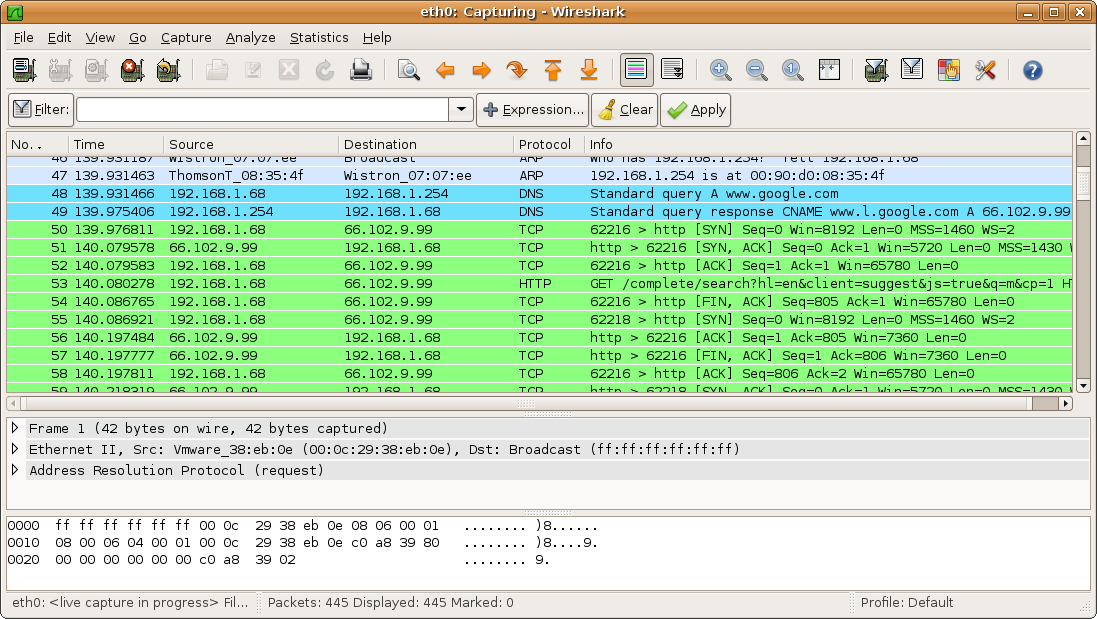
Wireshark is a free and open-source packet analyzer. It is used for network troubleshooting, analysis, software and communications protocol development, and education. Wireshark is very similar to tcpdump, but has a graphical front-end, plus some integrated sorting and filtering options.
Wireshark allows the user to put network interface controllers that support promiscuous mode into that mode, in order to see all traffic visible on that interface, not just traffic addressed to one of the interface's configured addresses and broadcast/multicast traffic. However, when capturing with a packet analyzer in promiscuous mode on a port on a network switch, not all of the traffic traveling through the switch will necessarily be sent to the port on which the capture is being done, so capturing in promiscuous mode will not necessarily be sufficient to see all traffic on the network. Port mirroring or various network taps extend capture to any point on net; simple passive taps are extremely resistant to malware tampering.
On Linux, BSD, and Mac OS X, with libpcap 1.0.0 or later, Wireshark 1.4 and later can also put wireless network interface controllers into monitor mode.

Wireshark is software that "understands" the structure of different networking protocols. Thus, it is able to display the encapsulation and the fields along with their meanings of different packets specified by different networking protocols. Wireshark uses pcap to capture packets, so it can only capture the packets on the types of networks that pcap supports.
  • Data can be captured "from the wire" from a live network connection or read from a file that recorded already-captured packets.
  • Live data can be read from a number of types of network, including Ethernet, IEEE 802.11, PPP, and loopback.
  • Captured network data can be browsed via a GUI, or via the terminal (command line) version of the utility, TShark.
  • Captured files can be programmatically edited or converted via command-line switches to the "editcap" program.
  • Data display can be refined using a display filter.
  • Plug-ins can be created for dissecting new protocols.
  • VoIP calls in the captured traffic can be detected. If encoded in a compatible encoding, the media flow can even be played.
  • Raw USB traffic can be captured.

Download Wireshark here

Source: Wikipedia


Wednesday, August 15, 2012

POWERFUL VIRTUALIZATION SOFTWARE

VMware Player is a freeware virtualization software package from VMware, Inc. (a company which was formerly a division of and whose majority shareholder remains EMC Corporation). VMware Player can run existing virtual appliances and create its own virtual machines (which require an operating system to be installed to be functional). It uses the same virtualization core as VMware Workstation, a similar program with more features, but not free of charge. VMware Player is available for personal non-commercial use, or for distribution or other use by written agreement.No support is provided by VMWare, but there is an active community website for discussing and resolving issues.
VMware claims the Player offers better graphics, faster performance, and tighter integration for running Windows XP under Windows Vista or Windows 7 than Microsoft's Windows XP Mode running on Windows Virtual PC, which is free of charge for all purposes.

Versions earlier than 3 of VMware Player were unable to create virtual machines (VMs), which had to be created by an application with the capability, or created manually by statements stored in a text file with extension ".vmx"; later versions can create VMs. The features of Workstation not available in Player are "developer-centric features such as Teams, multiple Snapshots and Clones, and Virtual Rights Management features for end-point security", and support by VMWare. Player allows a complete virtual machine to be copied at any time by copying a directory; while not a fully featured snapshot facility, this allows a copy of a machine in a particular state to be stored, and reverted to later if desired, e.g. after a demonstration or a virus infection test.
VMware Player is also supplied with the VMware Workstation distribution, for use in installations where not all client users are licensed to use the full VMware Workstation. An IT administrator can distribute a virtual machine created by Workstation to computers running Player without paying for additional VMware Workstation licenses.

Source: Wikipedia
Click here to download VMWare Player